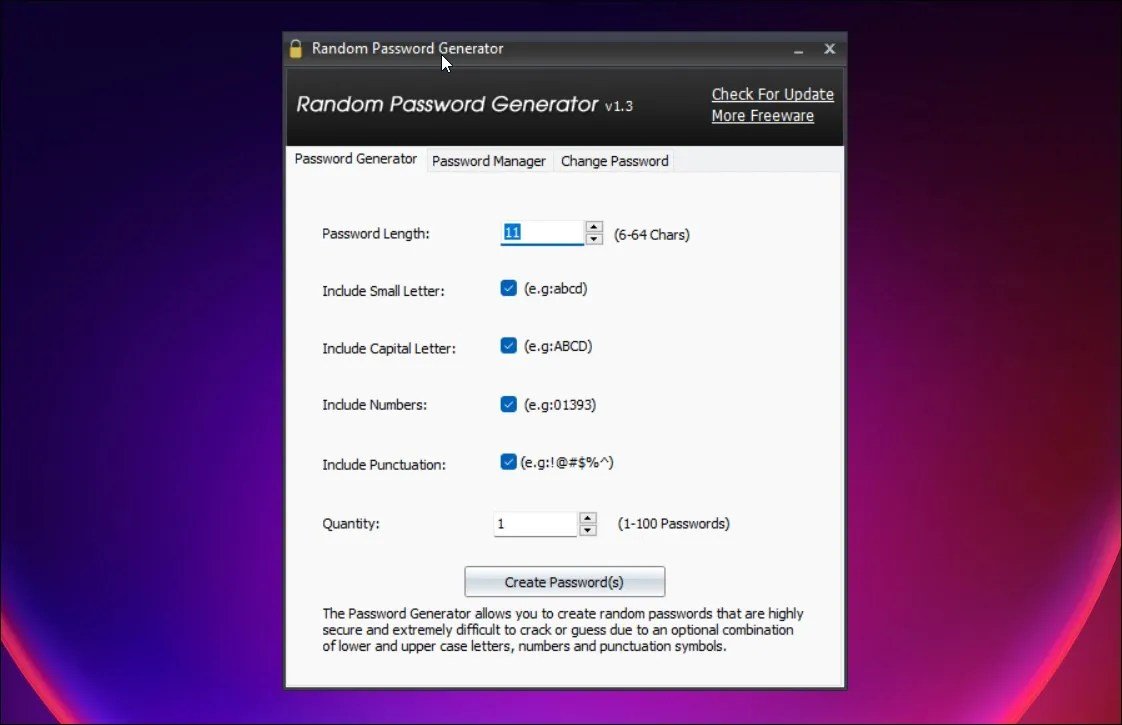
In our increasingly interconnected world, the phrase "digital security" often conjures images of complex firewalls and antivirus software. Yet, the first and most critical line of defense for your online identity isn't some high-tech gadget; it's the humble password. More specifically, it's a password so robust and unpredictable that it renders the most sophisticated cyberattacks futile. This is where Random Password & Security Code Generators become indispensable tools, transforming weak, guessable credentials into impenetrable digital fortresses that protect your personal information from the relentless tide of cyber threats.
Think of your online accounts as valuable assets, each secured by a unique lock. A weak, reused, or easily guessed password is like using the same flimsy padlock on every vault, or worse, leaving the key under the doormat. Cybercriminals are constantly probing these locks, looking for the path of least resistance. Generating truly random, complex passwords is your best strategy to keep those locks unpickable, ensuring your digital life remains private and secure.
At a Glance: Key Takeaways for Bulletproof Passwords
- Randomness is King: Truly secure passwords are a jumble of diverse characters, not words or dates.
- Length Matters Most: Aim for at least 12 characters; longer means exponentially harder to crack.
- Diversity Wins: Combine uppercase, lowercase, numbers, and special characters for maximum strength.
- Ditch Old Habits: Stop reusing passwords or using easily guessable information.
- Automate Security: Use a random password generator to create strong, unique passwords effortlessly.
- Store Smart: A secure password manager is essential for storing and accessing complex passwords safely.
- Layer Up: Always enable two-factor (or multi-factor) authentication wherever possible for an extra shield.
- Stay Vigilant: Regularly update passwords, especially after breaches, and use a VPN on public Wi-Fi.
The Unseen Battle: Why Your Passwords Are the Ultimate Defense
Every online account, from your banking portal to your favorite streaming service, holds pieces of your digital identity. While some might seem trivial, the collective sum of these accounts often contains personally identifiable information (PII) that, in the wrong hands, can lead to identity theft, financial fraud, and significant personal distress. Cybercriminals are increasingly sophisticated, employing automated tools that can test billions of password combinations per second.
Your password is the gatekeeper to this valuable data. It's the first barrier they encounter. If that barrier is weak – say, "password123" or your dog's name – you're essentially handing over the keys to your kingdom. The rise of data breaches, phishing scams, and malware makes the need for robust password security more urgent than ever. It's no longer just about protecting your email; it's about safeguarding your entire digital footprint and, by extension, your real-world identity.
What Makes a Password Truly Unbreakable? The Science of Strength
So, what does a "strong" password actually look like? It's not just about adding an exclamation mark to your existing one. A truly secure password is a randomly generated alphanumeric string that embraces diversity and length. Think of it as a complex genetic code that's nearly impossible to replicate by chance.
Here are the non-negotiable elements:
- Randomness: This is paramount. A secure password should have no discernible pattern, meaning no dictionary words, common phrases, sequential numbers (1234), or personal information (birthdays, pet names). It should look like a string of gibberish.
- Length: This is arguably the most critical factor. The longer a password, the exponentially harder it is to crack. While an eight-character password might seem robust, modern cracking tools can tear through it in minutes. A 12-character password, however, scales the difficulty to thousands of years.
- Character Diversity: A strong password draws from a wide pool of potential characters. This includes:
- Uppercase letters (A-Z)
- Lowercase letters (a-z)
- Numbers (0-9)
- Special characters (!@#$%^&*()_+-=[]{}|;':",./<>?)
A password leveraging 95 possible characters (52 letters, 10 numbers, 33 special characters) is significantly more robust than one limited to just letters. For instance, a quality random code generator will always incorporate these diverse elements by default, ensuring your passwords meet the highest standards.
The Human Factor: Our Password Habits Are a Cybercriminal's Dream
Despite widespread awareness of cyber threats, our password habits remain shockingly poor. Statistics paint a concerning picture: a staggering 57% of people still use slightly modified old passwords. This often means adding a "1" or changing an uppercase letter, offering minimal additional security. Even more alarming, roughly 20% of users incorporate easily guessable components like names, birth years, or common phrases into their passwords. These aren't just bad practices; they're invitations for cybercriminals.
Why do we do this? It's human nature to seek convenience. We want passwords that are easy to remember, which unfortunately makes them easy to guess or crack. But in the digital age, convenience often comes at the cost of security. Relying on memory for complex, unique passwords for dozens of accounts is simply not feasible, which is why automation becomes so critical.
The Math of Insecurity: Why Length and Complexity Rule
Let's talk numbers, because the math behind password security is compelling.
Consider a six-character password that only uses uppercase and lowercase letters. It might have over 19 billion combinations, which sounds like a lot. However, modern password cracking algorithms can churn through those combinations instantly.
Now, imagine an eight-character password that includes a mix of letters, numbers, and special characters. This is better, but it can still be cracked in just 39 minutes. That's hardly enough time to brew a pot of coffee, let alone protect your sensitive data.
Here’s where the power of length and complexity truly shines:
- Add just a few more characters, and the security skyrockets. A 12-character password that combines uppercase letters, lowercase letters, numbers, and special characters creates a staggering 540 sextillion (that's 540 followed by 21 zeros) possible combinations. Using current technology, a hacker would need approximately 3,000 years to guess such a password.
This exponential increase in cracking time is precisely why we advocate for longer, more complex, and truly random passwords. It's a fundamental principle that any effective random code generator is built upon. By making the effort to crack your password so astronomically high, you effectively deter most attackers, who will simply move on to easier targets.
How Random Password & Security Code Generators Work (and Why You Need One)
At its heart, a random password generator is a digital tool designed to create sequences of characters that are entirely unpredictable. Unlike humans, who unconsciously gravitate towards patterns, dates, or personal associations, these generators leverage cryptographically secure random number generation (CSRNG) to produce truly arbitrary strings.
Here’s how they provide unparalleled security:
- True Randomness: They don't pick from a pre-defined list or use simple algorithms. Instead, they draw upon sources of entropy (like system timings, mouse movements, or other environmental noise) to seed their random number generation, ensuring each character choice is genuinely unpredictable.
- Configurable Complexity: Most good generators allow you to specify the desired length and character types (uppercase, lowercase, numbers, symbols). This means you can tailor the password to meet the requirements of any website or service while maximizing its strength.
- Eliminates Human Error: By automating the creation of complex passwords, generators remove the temptation and human tendency to create weak, memorable credentials. You don't have to think; the tool does the hard, secure work for you.
- Unique Credentials for Every Account: This is perhaps their greatest benefit. Because generating a new, complex password takes mere seconds, you can easily create a unique password for every single online account you possess. This practice, known as password diversity, is crucial because it ensures that if one account is compromised in a data breach, your other accounts remain secure.
Consider a free, secure, and user-friendly online service like PasswordGenerators.net. It exemplifies the best practices in this space. Its key advantage is that it generates all passwords entirely in your browser using CSRNG. This means the service itself never sees, stores, or transmits any of the passwords you create. They are produced locally on your device and never sent over the internet, guaranteeing your privacy and security. This local generation aspect is a critical feature to look for, safeguarding your freshly minted, secure passwords from potential interception. Leveraging such a security code generator ensures your credentials are born secure and stay private.
Beyond Generation: Storing Your Fort Knox Passwords
So, you've just generated a string of 16 random characters that looks like "jW!$P8tF%qZv7#xS". How on earth are you supposed to remember that, let alone dozens of others just as complex? The answer lies in a secure password vault, more commonly known as a password manager.
A password manager is a secure, encrypted digital safe for all your login credentials. It's an indispensable tool in your cybersecurity arsenal, working in tandem with your random password generator. Here's why you need one and what to look for:
Why a Password Manager is Essential
- Secure Storage: All your passwords are encrypted (typically with 256-bit AES encryption, the current gold standard) and stored securely, making them virtually unreadable to anyone without the master code.
- Auto-Fill Convenience: Most managers seamlessly integrate with your operating system and web browsers, automatically filling in login details for websites and apps. No more typing complex passwords!
- Sync Across Devices: Cloud server storage ensures your encrypted vault is accessible across all your devices – desktop, laptop, tablet, and smartphone – always up-to-date.
- Strong Master Code: You only need to remember one extremely strong password: your master code. This is the single key that unlocks your entire vault.
- Security Audits: Many password managers include features that audit your existing passwords, identifying weak, reused, or compromised ones and prompting you to update them.
- Secure Sharing: Some even allow for secure sharing of credentials with trusted individuals or teams.
What to Look For When Choosing a Password Vault
- 256-bit AES Encryption: This is the industry benchmark for robust data encryption. Accept nothing less.
- Cloud Server Storage & Multi-Platform Support: Ensures your passwords are synced and accessible from any device, anywhere.
- Auto-Fill Capabilities: Essential for ease of use and convenience, making those long, random passwords manageable.
- Clear Recovery Options (with caution): While a robust master password is key, some services offer recovery options (e.g., emergency contacts). Understand how these work and their security implications.
- Reputation and Audits: Choose a reputable provider with a track record of security and transparency, ideally one that undergoes regular third-party security audits.
- Master Code Requirements: The service should enforce strong master password criteria, guiding you to create one that is both memorable to you but incredibly complex.
Remember, your master code is the ultimate key. It should be a truly strong, unique, and memorable passphrase (e.g., a string of unrelated words) that meets all the criteria of a complex password discussed earlier. Never write it down, and certainly never reuse it.
Your Ongoing Security Toolkit: More Than Just Passwords
While strong, randomly generated passwords and a secure password manager are the cornerstones of online security, they are part of a larger, ongoing effort. Think of it as a comprehensive security strategy that layers protections to create an impenetrable digital fortress.
1. Don't Reuse Passwords: The Golden Rule
This cannot be stressed enough. Generating a different, unique password for each and every account is non-negotiable. Why? Because data breaches are an unfortunate reality. When a company experiences a data breach, usernames and passwords are often leaked. If you've used the same password across multiple accounts, a single breach can compromise your entire digital life, leading to a domino effect of hacked emails, social media, and financial accounts. A good random password generator makes this easy, creating a new, strong credential every time.
2. Update Passwords Regularly and Strategically
While "change passwords every 90 days" used to be standard advice, the current wisdom is more nuanced. You absolutely must change a password if:
- Your credentials are part of a data breach: Many services like Have I Been Pwned? can alert you if your email or password has appeared in a known breach.
- You suspect unauthorized access: Seeing unfamiliar activity on an account, or receiving login notifications you didn't initiate, is a red flag.
- You've been hit by malware or phishing: Malware can log keystrokes, and phishing attempts aim to steal credentials. Assume compromise.
Beyond these critical instances, a good practice is to review and update all critical passwords (e.g., banking, email, primary social media) every six months. For less critical accounts, update them as needed or when prompted by your password manager's audit.
3. Use Two- or Multi-Factor Authentication (2FA/MFA)
This is a powerful extra layer of security that every account should have enabled whenever offered. It means that even if a cybercriminal somehow gets your password, they still can't access your account without a second piece of information.
- Two-Factor Authentication (2FA): Typically involves something you know (your password) and something you have (a physical device like your phone). After entering your password, a unique, time-sensitive code is sent to your registered phone via SMS or an authenticator app (like Google Authenticator or Authy). You then enter this code to complete the login.
- Multi-Factor Authentication (MFA): This expands on 2FA by requiring two or more verification methods. This could include biometrics (something you are, like your fingerprint via Touch ID or face scan via Face ID), a physical token, or even a USB security key.
Always activate 2FA/MFA on any account that supports it. It's an incredibly effective deterrent against even sophisticated attacks.
4. Use a Virtual Private Network (VPN)
A Virtual Private Network (VPN) encrypts your internet traffic, creating a secure tunnel between your device and the internet. While it doesn't directly protect your passwords, it plays a crucial role in preventing them from being intercepted, especially when you're using public Wi-Fi.
- Protection on Public Wi-Fi: Unsecured public networks (like those in coffee shops, airports, or hotels) are ripe for data interception. Without encryption, anyone on the same network with malicious intent could potentially "sniff" your data, including login credentials, as it travels over the network.
- Privacy: A VPN also masks your IP address, enhancing your overall online privacy and making it harder for third parties to track your online activities.
When accessing sensitive accounts, especially banking or email, on public Wi-Fi, always activate your VPN first. It's another essential layer in your overall security strategy.
Choosing the Right Random Password Generator for You
With several online and offline options available, how do you pick a reliable random password generator? Here's what to prioritize:
- Local Generation: As highlighted with PasswordGenerators.net, prioritize generators that create passwords entirely on your device (in your browser, or via a desktop/mobile app) without sending them over the internet. This ensures maximum privacy.
- Cryptographically Secure Randomness: Look for generators that explicitly state they use cryptographically secure random number generation (CSRNG). This guarantees genuine unpredictability.
- Customization Options: The best generators allow you to specify password length and include/exclude different character types (uppercase, lowercase, numbers, symbols) to meet various site requirements.
- User-Friendly Interface: While security is paramount, the tool should also be intuitive and easy to use, encouraging consistent adoption.
- No History/Logging: A trustworthy generator will never store a history of the passwords you've generated.
- Open Source (Optional but Recommended): Open-source generators allow security experts to audit their code for vulnerabilities, fostering transparency and trust.
By focusing on these features, you can select a tool that truly empowers you to create the strongest possible passwords with confidence.
Common Questions & Misconceptions About Random Passwords
Let's demystify some common concerns surrounding random passwords and generators.
"Are randomly generated passwords truly random?"
Yes, when generated by a well-designed tool using cryptographically secure random number generation (CSRNG). These algorithms are specifically designed to produce sequences that are statistically unpredictable and cannot be replicated or guessed through mathematical means. Unlike simple "random" functions in basic software, CSRNG uses high-quality entropy sources to ensure genuine randomness.
"If I use a password manager, do I still need a random password generator?"
Absolutely. They work hand-in-hand. The password manager securely stores your passwords, encrypts them, and provides convenient auto-fill. The random password generator creates those incredibly strong, unique passwords that the manager then stores. You need both for optimal security. Many password managers actually have a built-in generator for convenience.
"But I can't remember all these random passwords!"
You're not supposed to! That's the entire point of using a password manager. You only need to remember one strong master password for your vault, and the manager handles the rest, automatically filling in the complex, random credentials for each site. This completely removes the burden of memorization.
"What if I lose my master password for my password manager?"
This is a critical scenario. Most reputable password managers have limited recovery options precisely because of their strong encryption. If they could easily recover your master password, it would be a security flaw. Some offer emergency access options where trusted contacts can gain access after a waiting period, or require you to save an emergency kit with a recovery key. It is paramount to create an unforgettable master password and keep any recovery kit in a physically secure location (e.g., a locked safe). Losing it essentially means losing access to your entire vault.
"Can't hackers just guess my randomly generated password with enough time?"
Theoretically, yes. But practically, no. As the math showed, a long, complex, randomly generated password (12+ characters with all character types) would take thousands of years for current technology to crack through brute force. By the time a hacker could guess it, computing power would have advanced to a point where quantum cryptography would likely be the norm, rendering current encryption methods obsolete anyway. The goal isn't absolute, eternal uncrackability, but rather making the effort required so astronomical that it becomes an unfeasible target.
Taking Action: Securing Your Digital Life Today
The digital world demands vigilance, and your password hygiene is at the forefront of that defense. You have the power to transform your online security from a vulnerability into a fortress.
Here’s your actionable roadmap:
- Start Generating: Immediately begin using a random code generator for every new account you create. Make it a habit.
- Get a Password Manager: If you don't have one, research and invest in a reputable password manager. It's non-negotiable for modern online security.
- Audit and Update: Use your new password manager's audit features to identify weak or reused passwords among your existing accounts. Prioritize your most critical accounts (email, banking, social media) and update them with newly generated, unique credentials.
- Enable 2FA/MFA Everywhere: Activate two-factor or multi-factor authentication on every service that offers it. This is your most effective secondary defense.
- Use a VPN Strategically: Make it a habit to use a VPN whenever you connect to public Wi-Fi, especially when accessing sensitive information.
Your digital life is worth protecting. By embracing Random Password & Security Code Generators and adopting these comprehensive security practices, you're not just safeguarding data; you're safeguarding your peace of mind in an increasingly complex online world. Make the switch today – your future self will thank you.